Field notes · AI-first engineering
An AI-First Autonomous Build Environment for Flutter and AWS
We've built a development environment where an AI agent reads a user story, creates a spec, plans the work, implements a feature, deploys the backend, runs the mobile app, taps through the UI, verifies its own work, and fixes issues until it reaches a reasonable bar of completeness and quality. Devcontainers, LocalStack, an Android emulator, and Marionette MCP. No credentials in the container, minimal internet access, no real AWS within reach, no human supervision.
While setups like this are well-trodden ground by now, this is a description of a particular combination that has been working quite well for us. I hope some find it useful and tell us where you'd do it differently.
Why we set this up
We committed to an AI-first approach as the right way to build software going forward. That shaped a few concrete requirements. Agents had to be able to work unsupervised for long stretches, coming back only when there was a tangible result. They had to take on substantial chunks of functionality. The work had to be spec-driven, with a stable definition of done and reviewable artifacts of what was actually agreed upon as the goal. And since multiple agents would be working this way at the same time, each one needed its own isolated, firewalled environment where long unsupervised sessions are safe by construction.
A typical new feature in our project spans a Flutter UI, an authenticated API (with endpoints and request/response models defined in the OpenAPI spec), Lambda functions behind an API Gateway, possibly data model updates in DynamoDB, new feature flags in AppConfig, and other AWS services and infrastructure.
Our objective was to enable coding agents to do the work, with the entire feedback loop at their disposal and access to the development toolchain, cloud infrastructure, devices and apps.
The pieces
We've selected the following tools as the foundation for our AI-first development environment:
- Devcontainers provide a complete, reproducible toolchain with a clear trust boundary around it.
- LocalStack provides simulated AWS infrastructure which agents can create and destroy freely.
- An Android emulator gives the app somewhere real to run.
- Marionette MCP lets the agent interact with the running app: inspect widgets, tap, type, take screenshots, read logs.
Jira and GitHub sit outside the agent's network. The agent reads the user story from Jira, creates its tasks, and updates status as it works. GitHub is the only way to make changes: a branch and a pull request, nothing else.
Inside the container, the agent receives a curated set of skills and a Spec Kit constitution that define principles such as design-system compliance, accessibility, data residency, a bias toward simplicity, quality gates, validation strategies, and so on.
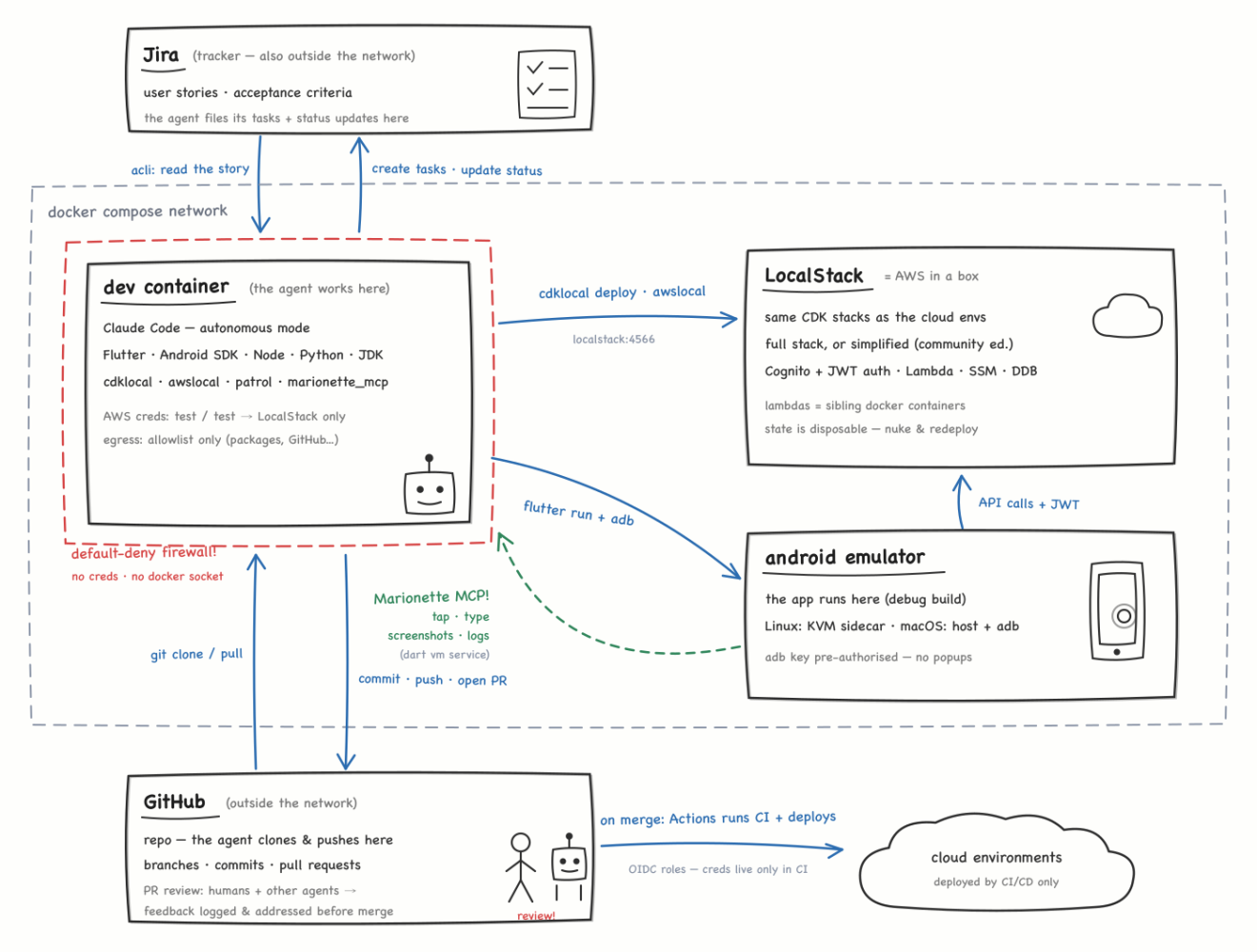
With all this in place, the agent can close the loop itself: spec → code → deploy → run → drive the UI → verify → iterate.
What the agent can and can't do
The devcontainer is where the agent works. It has the whole toolchain: Flutter, the Android SDK, JDK, Node, Python, CDK, cdklocal, awslocal, patrol, the Marionette MCP server, the claude CLI itself, and deliberately little else.
Network access is restricted by a default-deny egress firewall. init-firewall.sh applies iptables rules on every container start and allowlists only what development needs: Docker DNS, the LocalStack sidecar, adb ports to the host, GitHub, and the package registries (npm, PyPI, pub.dev), plus the Anthropic and Atlassian endpoints the tooling uses. Everything else times out.
For work against external APIs, there's a small escape hatch we call connected mode: setting ALLOW_UPSTREAM_APIS=1 also allows the hostnames that appear in the (git-ignored) environment config. Useful for functional validation against real upstreams.
The agent's changes leave the container in exactly one form: commits. It clones the repo from GitHub, works on a branch, pushes, and opens a pull request. CI runs the checks, and the PR is reviewed by humans and by other agents. Review feedback is logged on the PR and addressed before merge. Once it merges, GitHub Actions deploys to the real environments using OIDC-scoped IAM roles.
To be clear about the limits: the firewall is not a sandbox, and we don't treat it as one. It doesn't protect against bad writes inside the repo (Git and CI handle that) or against anything we deliberately mount into the container. The approach is simply to keep credentials and elevated access out of the agent's environment entirely, and let the firewall reduce the remaining noise.
LocalStack: the same stacks, locally
Having fully scripted infrastructure provisioning and configuration through CDK gives us flexibility in how much we emulate. For a given task, we can deploy an environment equivalent to the cloud infrastructure, including Cognito, API Gateway v2 with a Cognito JWT authorizer, Lambdas, AppConfig, SSM parameter layout, DynamoDB tables, and so on. Or we can dial the fidelity down to a simplified version of the stack that runs on the LocalStack Community edition with fewer emulated services, relaxed auth and mocked feature flags, which is plenty for most UI and Lambda work.
The daily workflow, from inside the dev container:
cdklocal bootstrap -c target=local -c env=dev
./scripts/localstack-seed-params.sh   # seed SSM BEFORE deploying
cdklocal deploy DataStack LocalApiStack \
  -c target=local -c env=dev -c force_local_bundling=true
Every shell in dev is already pointed at LocalStack via the container environment, so there are no exports and no way to accidentally target something real.
Emulation has its quirks. A few examples:
- LocalStack only parses virtual-hosted-style S3 requests when the
Hostheader contains a literal.s3.. So the S3 endpoint ishttp://s3.localstack:4566with matching Docker network aliases; otherwise CDK asset publishing fails with a confusing XML error. - Newer AWS SDK checksum streaming needs to be dialed back to
WHEN_REQUIRED, or LocalStack's S3 router rejects the upload. - SSM values are resolved at deploy time and baked into Lambda environments. Seed before you deploy, or placeholders get frozen into the functions, and redeploying an identical template won't refresh them.
- LocalStack state is ephemeral: recreate the container and the bootstrap, stacks, and seeds are gone.
Running and driving the app
Getting a device. The emulator lives outside the main devcontainer:
- On Linux hosts with KVM, an opt-in
android-emulatorcompose sidecar (behind a compose profile, so it never starts by accident) runs Google's emulator image. The dev container's adb key is shared with the sidecar at startup, soadb connect android-emulator:5555works without an authorization dialog. - On macOS, where Docker can't do KVM, the emulator runs on the host via Android Studio and the container reaches it through
host.docker.internal. The firewall allows the adb ports to the host gateway and nothing else.
Either way, the agent runs the app against the local cloud, with hostnames that resolve from inside the emulator:
flutter run -d android-emulator:5555 \
  --dart-define=API_BASE_URL='http://localstack:4566/_aws/execute-api/<api-id>' \
  --dart-define=AUTH_MODE=local
Driving the app. This is where Marionette MCP comes in. The app initializes MarionetteBinding in debug builds only:
// MarionetteBinding registers VM service extensions that let AI agents
// drive the app (tap, type, screenshot, inspect) via the marionette_mcp
// server. Debug-only: it depends on the VM service and must never ship.
if (kDebugMode) {
  MarionetteBinding.ensureInitialized();
}
The marionette_mcp server is baked into the container image and registered in the repo-root .mcp.json, so Claude Code picks it up automatically, on the host and in the container alike:
{
  "mcpServers": {
    "marionette": { "type": "stdio", "command": "marionette_mcp", "args": [] }
  }
}
Because flutter run executes inside the dev container, adb forwards the Dart VM service to localhost there. The agent takes the ws://127.0.0.1:<port>/<token>/ws URI from the run output, connects Marionette to it, and from then on it can:
- see the widget tree of the current screen
- interact the way a user would
- take screenshots and "see" what actually rendered
- read the app's runtime logs
What a feature cycle looks like
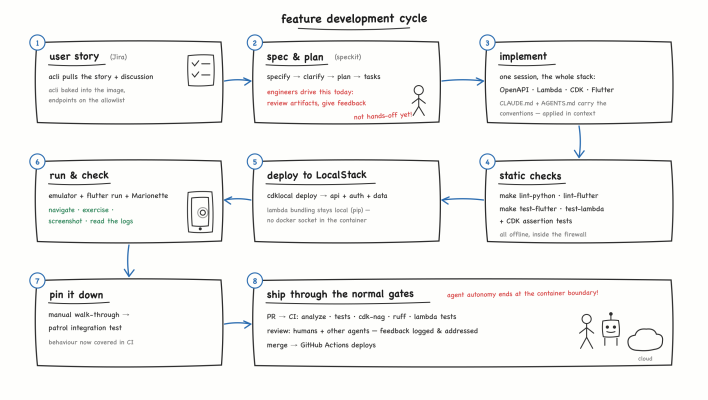
A typical feature implementation cycle goes roughly like this:
- From a user story to a spec and plan, before any code is written. Atlassian's
acliis baked into the container image, and its endpoints are on the firewall allowlist. The agent pulls the user story and its discussion, then initiates the Spec Kit workflow. We are not yet in fully hands-off workflow choreography mode at this step; engineers are driving the workflow, reviewing the Spec Kit artifacts and providing feedback. - Implement across the stack. Once the spec is ready, we let the coding agent do its work. The monorepo layout lets a single session touch the OpenAPI spec, the Lambda handler, the CDK stack, and the Flutter UI together, with
CLAUDE.mdandAGENTS.mdcarrying the project conventions so they're applied in context rather than caught in review. - Static checks. Python linting with ruff, Flutter analyze and test, Lambda unit tests, and CDK assertion tests are all runnable offline inside the firewall.
- Deploy to LocalStack. As above. Lambda bundling is forced to be local (pip, not Docker) because the dev container has no Docker socket.
- Run and check. Emulator,
flutter run, Marionette: navigate to the feature, exercise it, take a screenshot, read the logs. - Pin it down. Promote the manual walk-through into a patrol integration test so the behaviour is covered in CI.
- Ship through the normal gates. The agent's autonomy ends at the container boundary. PRs go through the usual CI pipeline (analyze, tests, cdk-nag, ruff, Lambda tests) and get reviewed by humans and by other agents; the feedback is logged on the PR and addressed before merge. Real deployments happen via GitHub Actions.
Writing docs the agent will read
One interesting thing to watch in our repo has been the fate of the technical documentation. It started, as usual, with notes written by humans for humans. By now a good share of it is written by coding agents for other agents. More and more documentation artifacts open with or contain phrases such as "You are running inside the project devcontainer...".
The same shift shows up in other ways. Config files carry comments explaining why, plus the error message you'll see if the assumption breaks ("if you see invalid XML received, check AWS_ENDPOINT_URL_S3..."). CLAUDE.md records not just commands but the traps: seed-before-deploy ordering, the Gradle heap cap sized for the Docker VM, the stale Gradle cache when a repo is shared between host and container. None of this is prose a human would enjoy reading; all of it is exactly what an agent needs in context at the right moment.
Documentation is just one practice quietly reorienting from a human audience to an agent audience. If code eventually stops being read or touched by humans at all, presumably the rest of the best-practices lineup (code review, style guides, naming conventions, even "readability" as a value) gets rethought around the same question: what does the next agent need to do this job well?
In conclusion
We're curious what everyone else is doing. What does your environment look like? How far do you let agents verify their own work: full autonomy in a sandbox, human in the loop for every step, something in between? If you're on a different stack, what serves as the LocalStack or Marionette for you? And if you've already wired the user-story-to-PR chain end-to-end, we'd genuinely like to hear how it's going. Happy to compare notes.